The internet contains most of human knowledge. The problem is that access to it depends entirely on infrastructure – power grids, cell towers, fiber cables, data centers – that most people have no control over and that can fail without warning.
An offline knowledge server is a direct answer to that dependency. It is a computer on your local network that stores reference content locally and serves it to your devices without touching the internet. Pull the plug on your router, and it keeps working.
What an Offline Knowledge Server Actually Does
At its core, an offline knowledge server does two things: it downloads content while you have an internet connection, and it serves that content to devices on your local network when you do not.
The content varies by platform, but a capable system typically includes some combination of the following:
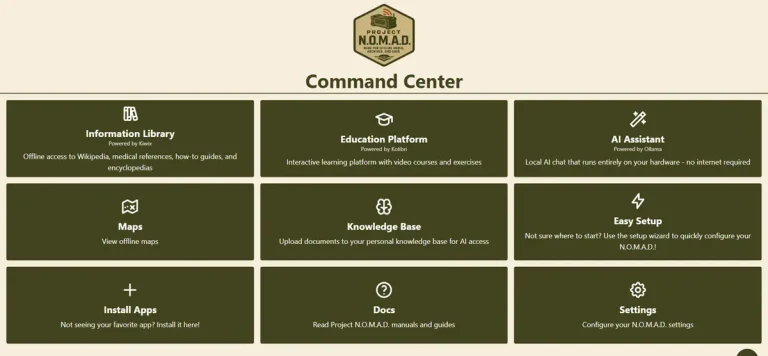
Offline encyclopedia – a local copy of Wikipedia, compressed and indexed for fast search. The full English Wikipedia with images runs about 125 GB. Text-only is far smaller. Once downloaded, every article is available instantly, no connection required.
Offline maps – street-level map data stored locally, covering whatever regions you choose. Zoom from continent level down to individual streets with no signal. These are particularly valuable for navigation in areas with poor cell coverage, or as a backup when cell networks are congested or down.
Local AI assistant – on more capable systems, a large language model runs directly on the server hardware with no cloud connection. Queries stay on your network. Nothing is sent to any external service. The AI can help search and summarize your local knowledge library, answer general questions, and assist with writing tasks entirely offline.
Educational content – platforms like Kolibri deliver Khan Academy courses, interactive lessons, and K-12 curriculum offline. For families in rural areas or anyone preparing for extended connectivity loss, this is one of the more practically valuable features.
Reference libraries – medical references, survival guides, repair manuals, Project Gutenberg books. The kind of content you hope you never need urgently but want available if you do.
How They Work on Your Network
An offline knowledge server connects to your existing router via Ethernet, the same way any other device on your network does. Once connected, every device that can reach your router – phones, laptops, tablets – can access the server through a standard web browser. No apps to install, no accounts to create.
From a user’s perspective it feels like browsing a local website. You type in the server’s IP address, or a local hostname if you set one up, and the interface loads immediately. Search Wikipedia, open a map, start an AI conversation – all of it happens on your local network without touching the internet.
The server itself handles content updates while an internet connection is available. When the connection drops, it simply stops updating and keeps serving what it has. The transition is seamless.
What Separates a Good System from a Basic One
Not all offline knowledge servers are equivalent. The differences come down to a few factors that matter a lot in practice.
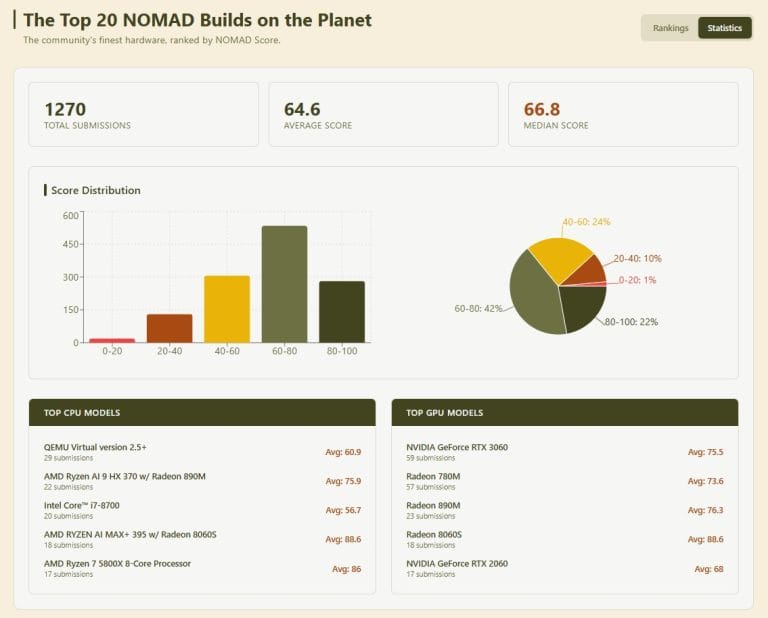
Hardware capability – the knowledge library and maps components run adequately on almost any modern computer. Local AI is where hardware makes a significant difference. A system without GPU acceleration runs AI models slowly enough that conversations feel labored. A system with a capable integrated GPU – AMD Radeon 780M or 890M class hardware – runs 3 to 8 billion parameter models at 30 to 55 tokens per second, which is fast enough for real conversations. A dedicated NVIDIA GPU pushes that to 100+ tokens per second.
Content depth – some systems offer basic Wikipedia and little else. More complete platforms include medical references, survival guides, educational content, and offline maps in addition to the encyclopedia. The breadth of available content matters when the system is being relied on rather than used casually.
Management interface – a system that requires command-line management is accessible to technical users and no one else. A well-designed dashboard that a non-technical family member can navigate makes the difference between a system that gets used and one that sits idle.
Update and content management – can you add content after initial setup? Can you update Wikipedia as new information becomes available while online? A good system handles this through the same management interface rather than requiring manual file management.
Open source or proprietary – this matters for long-term reliability. A proprietary system depends on the vendor staying in business and continuing to support it. An open source system can be maintained, forked, and updated by anyone. For something intended to work when infrastructure fails, open source is a meaningful reliability consideration.
The Leading Open Source Option
Project NOMAD is currently the most capable free offline knowledge server available, built on open source components including Kiwix for the offline library, Ollama for local AI, and Kolibri for education content.
It reached number one on GitHub trending in March 2026 with over 28,000 stars and has an active community of contributors and builders. The project is free to download and install on any x86 Linux machine.
The tradeoff is that getting it running requires sourcing appropriate hardware, installing Linux, running the install script, and downloading content – a process that takes an afternoon for someone technically comfortable and longer for everyone else. Once running, the system is straightforward to use from any browser on the network.
Commercial Pre-Built Options
For people who want an offline knowledge server without building one from scratch, the commercial market has a few options. PrepperDisk ($199 to $279), the Doom Box ($699), and R.E.A.D.I. ($499) all ship as pre-configured hardware.
The limitation these products share is that they run on Raspberry Pi hardware. Raspberry Pi is a capable single-board computer for lightweight tasks, but it is not designed for local AI inference at conversational speeds. None of the Raspberry Pi-based commercial options offer GPU-accelerated AI.
Personal Codex builds pre-configured NOMAD appliances on more capable hardware – AMD Ryzen 7 Zen 4 mini PCs with integrated Radeon graphics for the Codex Standard, which delivers the full NOMAD experience including AI at 30 to 55 tokens per second. Every unit ships configured, content loaded, and benchmarked.
Use Cases Worth Knowing About
Emergency preparedness – this is the most cited use case, and it is straightforward. When power outages, hurricanes, or infrastructure failures take down cell networks and internet service, a local knowledge server keeps running on battery or generator power. Medical references, first aid guides, local maps, and communication tools are all accessible to anyone on the local network.
Off-grid and rural living – for cabins, homesteads, RVs, and sailboats where connectivity is intermittent or expensive, a local server provides the reference depth of an internet connection without depending on one. Satellite internet is improving but still has latency and data cap constraints that make a local knowledge library a practical complement.
Privacy – a local AI assistant that processes queries on your own hardware, with nothing transmitted to external servers, is a genuinely different privacy posture than cloud AI services. For people with professional confidentiality concerns or a general preference for keeping queries private, local AI is not a workaround – it is the right tool.
Education in low-connectivity areas – Khan Academy and K-12 curriculum delivered offline to a classroom or household with unreliable connectivity is a meaningful capability. The Kolibri platform that NOMAD uses was specifically designed for this context.
Overlanding and remote travel – detailed offline maps for regions with no cell coverage, combined with reference content and an AI assistant, is a capable setup for extended remote travel.
What to Look For When Evaluating Options
If you are evaluating offline knowledge servers – whether to build one yourself or buy a pre-configured unit – here are the questions worth asking:
Does it run GPU-accelerated AI, or CPU-only? The difference in conversational AI speed is substantial.
What content is included, and can you add more? A fixed content set is less useful long-term than a system that lets you download and update content as your needs change.
Is the software open source? For infrastructure you are relying on, the long-term supportability of open source matters.
What hardware does it run on? Raspberry Pi-based systems have real limitations for AI workloads that x86 hardware running a capable iGPU or discrete GPU does not.
How is it managed day-to-day? A web dashboard your whole household can use is more practical than command-line management.
How is performance measured and verified? A system with a published benchmark score – like the NOMAD Benchmark Score – gives you a comparable, verified data point rather than marketing claims.
Closing Note
An offline knowledge server is not a niche product for a specific type of person. It is a reasonable infrastructure decision for anyone who values having access to knowledge and navigation tools that do not depend on connectivity they do not control.
The technology is mature, the content libraries are genuinely comprehensive, and the hardware required is affordable. The main barrier has historically been setup complexity – which is exactly what pre-configured options address.
The Codex Standard is a pre-configured Project NOMAD appliance built for the full offline knowledge experience, including GPU-accelerated AI. See build specifications and pricing.