Most people find out about Project NOMAD the same way. Someone posts about it online, the thread takes off, and suddenly tens of thousands of people are asking the same question: wait, you can run all of that offline, on hardware you own, for free?
That is essentially what Project NOMAD is. But the details are worth understanding, because the project is more capable – and more practical – than the headline suggests.
The One-Sentence Version
Project NOMAD is a free, open source offline server that runs Wikipedia, a local AI assistant, maps, and educational content on your own hardware, with no internet connection required after setup.
The full name is Node for Offline Media, Archives, and Data. It was built by Chris Sherwood of Crosstalk Solutions, a networking infrastructure company, and released under the Apache 2.0 open source license. That means the software is free to use, modify, and distribute. No subscriptions, no paywalls, no telemetry.
What It Actually Does
Project NOMAD bundles several powerful open source tools into a single system managed through a web-based dashboard called the Command Center. Once installed, the whole thing runs on your local network and is accessible from any device with a browser – phone, laptop, tablet – without touching the internet.
Here is what each component does:
Information Library (powered by Kiwix)
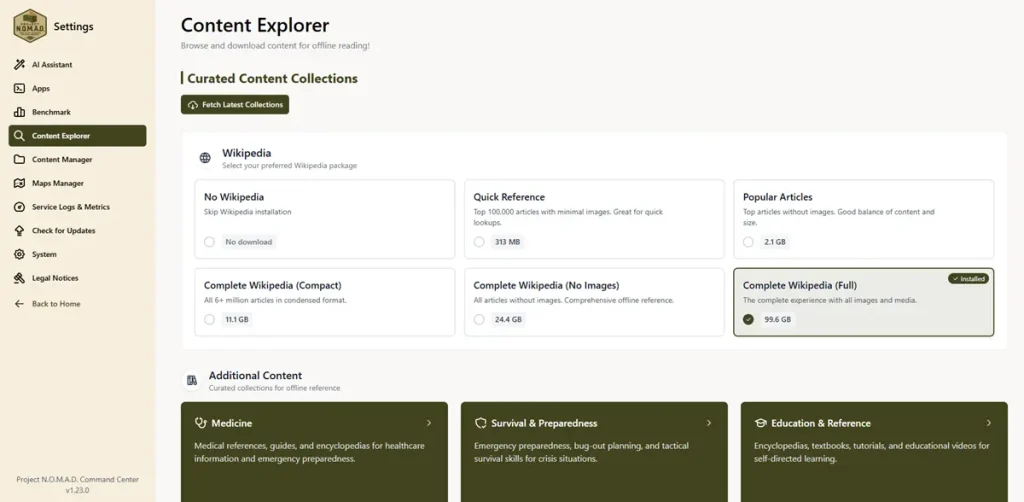
This is the offline Wikipedia component, and it is the feature most people come for. Kiwix is an established open source tool for reading compressed web content offline, and NOMAD uses it to serve Wikipedia, Project Gutenberg books, medical references, survival guides, repair manuals, and other curated collections. The full English Wikipedia with images takes up about 125 GB. Text-only is significantly smaller. You choose what to download, and you can add or remove content at any time through the dashboard.
AI Assistant (powered by Ollama)
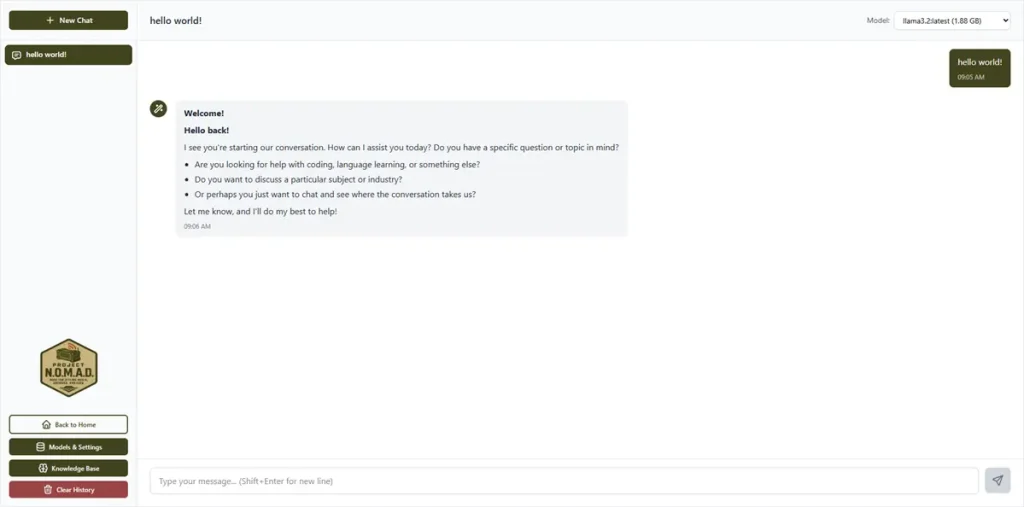
This is the component that made the project go viral. Ollama is an open source tool for running large language models locally, and NOMAD integrates it into the Command Center with a chat interface. The AI runs entirely on your hardware – no API keys, no accounts, no data leaving your network. It is also completely optional. If you do not want the AI, you skip it during setup and everything else still works. The capability of the AI depends heavily on your hardware – more specifically, whether your system has a GPU that can accelerate inference.
Offline Maps (powered by OpenStreetMap via ProtoMaps)
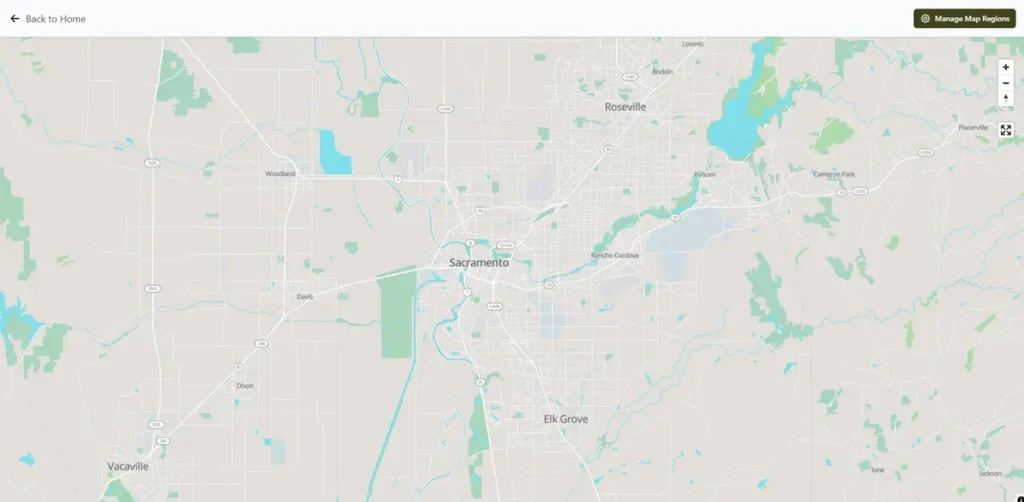
Street-level world maps stored locally. You choose which regions to download – just your country, a few states, or the entire world (roughly 125 GB for global coverage). Once downloaded, the maps work with no connection, zooming from continent level down to individual streets.
Education Platform (powered by Kolibri)
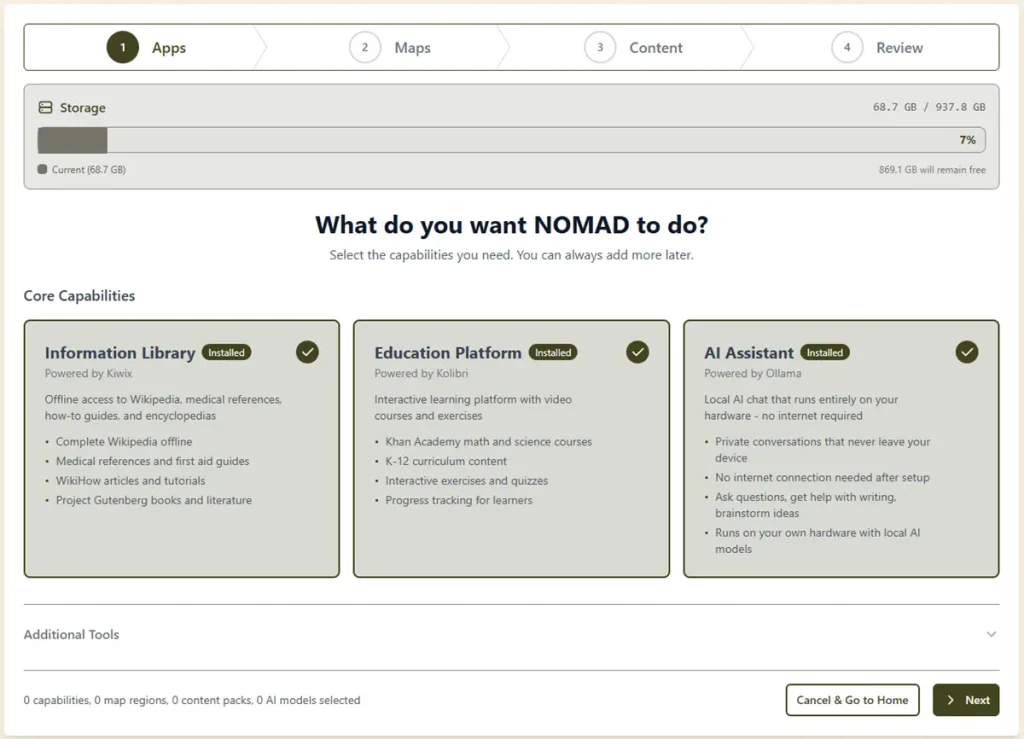
Kolibri is a platform built by Learning Equality specifically for offline educational environments. Through NOMAD it delivers Khan Academy courses, TED Talks, and K-12 curriculum content with no internet required. This is the component most valuable for families, homeschoolers, and anyone in a rural or remote situation.
How It Works Technically
NOMAD runs as a collection of Docker containers managed by the Command Center. Docker is a system for running software in isolated environments – you do not need to understand it to use NOMAD, because the installer handles everything automatically.
The install process is two commands pasted into a terminal. The installer downloads and configures Docker, sets up all the containers, and launches the web interface. From there the Easy Setup wizard walks you through choosing which content to download.
After setup, NOMAD stays connected to the internet while you have a connection, keeping content updated. When the connection drops, it keeps running from what it has already downloaded. That transition is seamless – the system does not need to be configured differently for online versus offline operation.
Every device on your local network can reach it through a browser at your server’s IP address. No apps to install, no accounts to create on other devices. Just connect to the same Wi-Fi as the server and open a browser.
Who Is Building This
Chris Sherwood created Project NOMAD and continues to lead development. Crosstalk Solutions, his company, is focused on networking infrastructure – which makes the offline server concept a natural fit. The project has 28 contributors on GitHub and has shipped 69 releases since launch.
The codebase is 93.5% TypeScript. The project has a public roadmap where users can vote on features, and development has been active. The v1.32.1 stable release shipped in late May 2026, and the project reached the number one trending position on GitHub in March 2026 following a viral surge.
Why It Went Viral
In March 2026 the project hit number one on GitHub trending after accumulating over 28,000 stars and 2,700 forks. A single tweet about the project reached 3.1 million views. Coverage followed in ZDNet, Cybernews, Hacker News, and elsewhere.
The reaction made sense. The combination of offline Wikipedia, private local AI, and offline maps in a single free package – installable in two commands – is genuinely unusual. Similar commercial products charge $200 to $700 for hardware that is less capable and locked to specific configurations. NOMAD runs on any x86 Linux machine and scales from a refurbished $200 desktop to a GPU-accelerated workstation.
What It Is Not
A few things worth being clear about:
It is not a Raspberry Pi project. NOMAD requires x86 hardware running Ubuntu or Debian Linux. The official documentation explicitly redirects Raspberry Pi users to Internet in a Box, which is designed for lightweight ARM hardware. NOMAD is built for more capable hardware because real AI inference requires it.
The AI is not magic. It is a local large language model running on your hardware. It is good at finding and summarizing information from your offline library, answering general knowledge questions, and helping with writing tasks. It does not have internet access, cannot look up current events, and its quality is tied to the model you are running and the hardware running it. Smaller models on basic hardware produce noticeably different results than larger models on GPU-accelerated hardware.
It is not a replacement for the internet. It is a replacement for the knowledge and tools the internet provides. The content is downloaded and stored locally. It does not stream, does not require a signal, and does not phone home.
It does not include a router. NOMAD connects to your existing network via Ethernet. Devices on that network can access it over Wi-Fi through your existing router. The server itself is just a PC running software.
Hardware Requirements
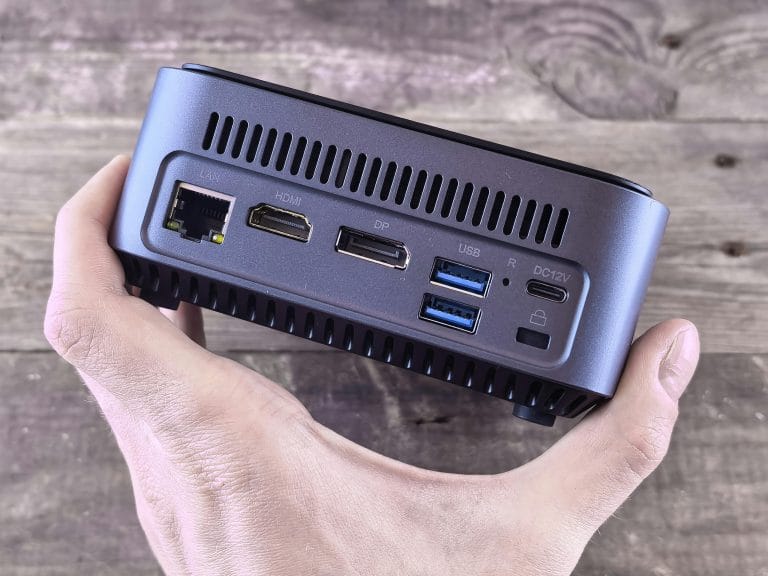
NOMAD runs on any x86 Linux machine. The official recommended specs for the full experience are an AMD Ryzen 7 with Radeon integrated graphics or an Intel Core i7, 32 GB of RAM, and a 1 TB SSD. A dedicated NVIDIA GPU is optional but significantly improves AI performance.
Budget hardware – refurbished corporate PCs in the $150 to $300 range – runs NOMAD fine for the knowledge library, maps, and education modules. AI performance on that hardware is limited but functional for basic use.
The AI component is where hardware differences become meaningful. A system with an AMD Radeon 780M or 890M integrated GPU runs 3 to 8 billion parameter models at 30 to 55 tokens per second – fast enough for real conversations. A dedicated NVIDIA GPU pushes that to 100+ tokens per second and opens up larger, more capable models.
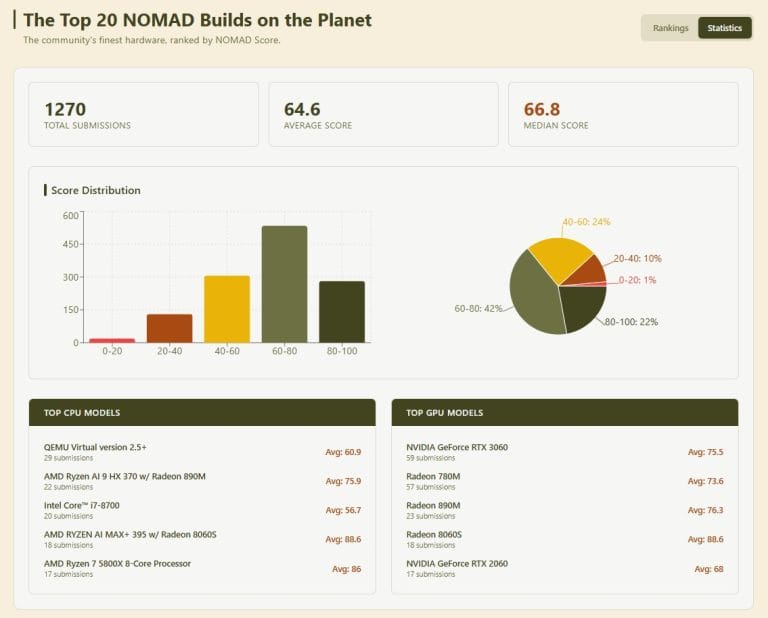
Community builds are tracked on the NOMAD Benchmark leaderboard at benchmark.projectnomad.us, where over 1,270 results have been submitted. The NOMAD Benchmark Score page on this site covers how that scoring system works in detail.
Similar Products and How They Compare
The commercial alternatives to DIY NOMAD builds are PrepperDisk ($199 – $279), the Doom Box ($699), and R.E.A.D.I. ($499). All three run on Raspberry Pi hardware. None include GPU-accelerated AI. The official NOMAD comparison page shows that PrepperDisk AI capability is listed as none, while the Doom Box and R.E.A.D.I. offer basic 7B model support without GPU acceleration.
NOMAD runs GPU-accelerated AI on hardware you choose, supports the full English Wikipedia, full global maps, and the complete Khan Academy library, and is free.
The tradeoff is that NOMAD requires more capable hardware and some setup. It is not a plug-in appliance out of the box. For people who want that experience – pre-configured, tested, and ready to run – that is what Personal Codex builds.
The Pre-Built Option
Setting up Project NOMAD from scratch means sourcing hardware, installing Linux, running the install script, choosing and downloading content, and verifying everything works. For technically confident users that process takes an afternoon. For everyone else it is a meaningful barrier.
Personal Codex builds NOMAD appliances to order – hardware sourced, Linux installed, NOMAD configured, content loaded, benchmarked, and shipped ready to plug in. Each unit connects to your existing router via Ethernet, and every device on your network can access it immediately through a browser.
The Codex Standard is built on AMD Ryzen 7 Zen 4 hardware with Radeon 780M or 890M integrated graphics – the hardware tier that consistently scores in the 80 – 95 range on the NOMAD Benchmark and delivers 30 – 55 tokens per second for AI workloads.
Further Reading
The official Project NOMAD site is at projectnomad.us. The GitHub repository at github.com/Crosstalk-Solutions/project-nomad has the full codebase, issue tracker, and release history. The community Discord is linked from the NOMAD site and is active.
If you want to understand how hardware performance is measured across NOMAD builds, the NOMAD Benchmark Score page covers the scoring system, what the ranges mean, and how real-world hardware maps to actual AI performance.